Posts

Showing posts with the label TechTip

Tech Tip 10/11 - Google Maps Street View

Today's tech tip is just something fun and geeky. Check out Google Maps Street View. http://www.google.com/intl/en_us/help/maps/tour/#street_view There are 15 cities in the US that are now offering street view. What is it? Why must you have it? Well, its cool. You virtually drive down the street and see around you. You can twist your head and look around 360 degrees as well. I just took a virtual trip down Michigan Avenue. How can it help your kids? Here is the really cool part. Google Street View is in 15 cities. Use it to drive by Ground Zero, or follow Holden Caulfield through the streets of New York in a modern Catcher in the Rye , compare architecture in different cities, or use proportional triangles to determine the height of a building...there is a lot of potential there. I don't know if you have used other features of Google maps yet in your classroom, but I will be showing you how over the next few weeks as we embark on another thread ...
TechTip 9/5 - Quintura

Image
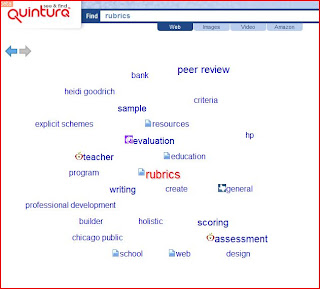
Good Evening, Busy day today - so here is a short late night tip: Here is a rather cool site that is in the ballpark of tagging, which is the theme we are on this week. www.quintura.com Quintura is a visual search engine. It extracts keywords from search results and builds a word cloud. By clicking words in the cloud, you refine your query. It is really cool to see your search morph and change as you click on words. It is a great tool for visual learners. It is also helpful if you are searching "around" a topic and can't come up with the exact right term. Check out the search for rubrics: I am only showing you 1/2 of the screen. On the right is the listing of sites that changes as you click on terms in the cloud. A real fun thing to search for when using quintura is pictures. The images will show on the right and also change as you maneuver through the cloud. Try it I think you will agree. Quintura is just another search engine - but it does it visually. Kinda cool...

TechTip 9/4 - Cool Tag Uses

Image
I wanted to continue the theme of tagging and the possible uses. One of the neatest uses of tags is to create tag clouds. A tag cloud is a visual representation of the common words in a group of text - words that appear more frequently are larger and bolder. This text can be from any source and can be in any language. Here is one for Act I of Romeo and Juliet (I'll show you how to do this later in this tip) I am sure something like this could be a great discussion starter - or could be excellent in the review of a particular piece of text. One of my favorites is a website that has taken many of the past Presidential speeches and has created clouds for each speech. It is really interesting to see what words (topics) have changed or remained over the years. Here are other good clouds: Tag Clouds from the Democratic Debate Flickr Photos - popular photos del.icio.us - popular bookmarks Technorati - popular blogs The coolest option is to have you...

TechTip 8/30 - del.icio.ous

Here is the tip I promised you on del.icio.us. Besides having an incredibly cool name del.icio.us is an awesome tool. It is a social bookmarking service. "A What" you say... Here is the skinny: You can create an account at http:// del.icio.us You can then start saving your bookmarks there You can then retrieve your bookmarks anywhere in the world Big deal - right? Wait there is more: Once you have your bookmarks you can choose ones to share with your friends - like mine http://del.icio.us/hthiele You can also search other's bookmarks for good stuff - instead of trying to find the best sites on your own For example - lets say I wanted to find the best sites on literacy. I could go and search for literacy on google and sift through the 45,700,000 results that are found. Or, I can go to del.icio.us and do the same search and find the sites that other people have deemed good enough to bookmark. They key to all of this is tags. Tagging is a term you should be fa...

TechTip 8/30 - Top 100 Tech Tools

It has been a busy day, so this one is going out late. David Jakes turned me on to this site through his del.ico.us account . If that last sentence made no sense - don't worry - I'll describe del.ico.us tomorrow morning. Anyway, the site I want to tell you about is http://www.c4lpt.co.uk/recommended/top100.html This list has been compiled from the Top 10 Tools lists of over 100 learning professionals (consultants, analysts, developers, practitioners, academics, etc). This is a great spot to go to and look for things you don't know about in technology. Take a minute to click on the link of something you aren't familiar with and peruse it for a little while. Don't worry you won't wast your time - they are the top 100 after all!

TechTip 8/23 - The Educators Reference Desk

The Educator's Desk Reference: http://www.eduref.org/index.shtml - here is what they say about it: The Educator's Reference Desk builds on over a quarter century of experience providing high-quality resources and services to the education community. From the Information Institute of Syracuse, the people who created AskERIC, the Gateway to Educational Materials, and the Virtual Reference Desk, the Educator's Reference Desk brings you the resources you have come to depend on. 2,000+ lesson plans, 3,000+ links to online education information, and 200+ question archive responses. In other words one-stop shopping for great stuff on-line for integrating technology and information into your classroom.

Tech Tip 8/22 - Using the Net as Your Calculator

My Grandfather always used to joke that a computer was nothing more than an oversized calculator (in a way he was right). Did you know that there are a bunch of awesome calculators on-line and you probably type words into one quite often? Here are 3 cool calculator tools: 1. Google Yes that is right - Google! If you type something in the search bar as a calculation and click search - the first results back will be your answer. You can do this for just about any math - including conversions (sorry factor-label method lovers). Here are directions. 2. http://www.calcoolate.com/ Very Cool. Does calculations, conversions, and keeps a history of your calculations. Real nice for teaching students to follow their steps in calculations without carrying around rolls of calculator tape. 3. E-tutor Graphing calculator - Those TI's are pretty expensive. Get your graph groove on for free!

Tech Tip 8/21

Happy 1st day of school! As we go into this year I will be sending out Technology Tips on a pretty regular basis (a few times a week). Some of these will be cool websites or tools you can use. Most will be helpers or ideas for the classroom. Every so often they may just be good stuff to know. Either way you can be assured that I will be delivering a daily dose of geekiness. Past tech tips will be available at my blog . Here is your first installment... I want to introduce you to a couple of concept-mapping sites. Both of these sites allow you and your students to build mind-maps which take large difficult concepts and break them down into smaller manageable pieces. Here are some websites that have great examples or discussion: http://www.lifeclever.com/6-illuminating-concept-maps-you-should-know-about/ http://members.optusnet.com.au/~charles57/Creative/Mindmap/ http://www.mind-mapping.org/article_main.php Anyway back to the cool tools... The 2 most popular si...